Measuring Your Body's Secret Sense
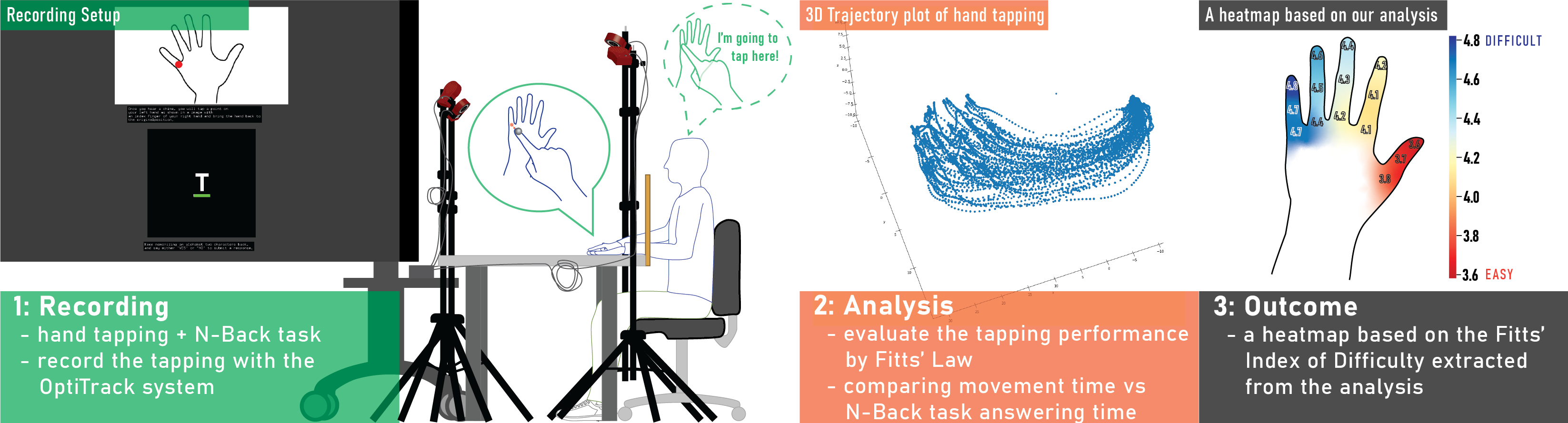
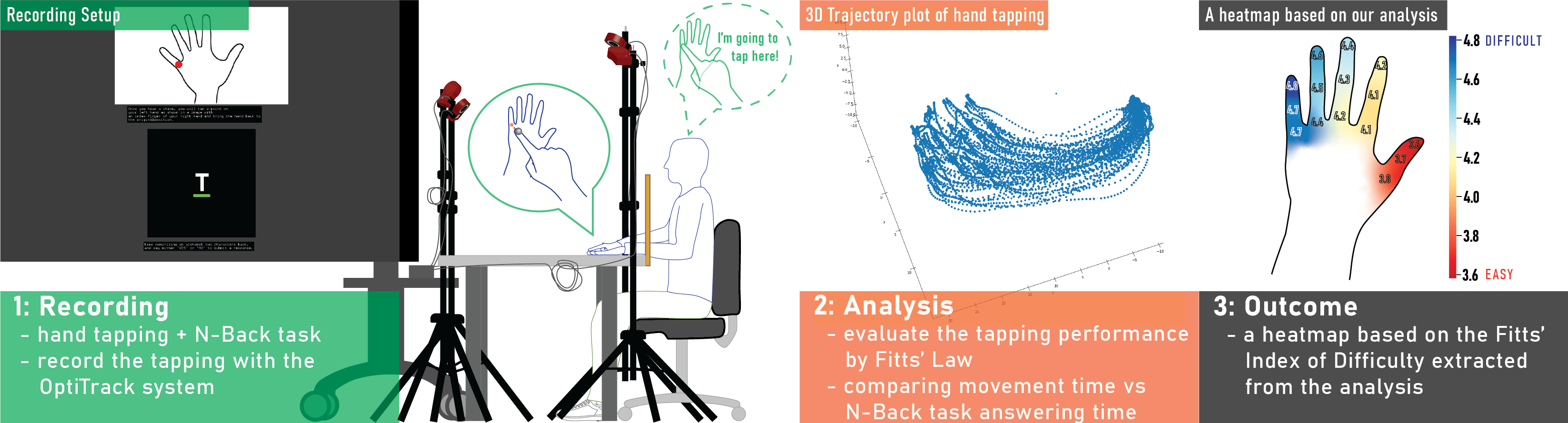
In simple terms: Close your eyes and touch your nose. How did you know where your nose was without looking? That's proprioception-your body's sense of where it is in space. I developed a new way to measure how accurately you can locate different parts of your hand without looking, which helps design better smartwatches and gesture interfaces.
🎯 Key Takeaways
- Thumb area is most accurate - you can locate it without looking with minimal error
- Pinky area is least accurate - error rates significantly higher
- Cognitive load matters - when your mind is busy, your body awareness decreases
- Fitts' Law applies - the classic HCI formula works for proprioceptive pointing too
- Design implications - critical wearable controls should go on high-proprioception regions
The Hidden Sense That Makes Technology Work
You've probably heard of the five senses: sight, hearing, touch, taste, smell. But there's a sixth sense that's crucial for how we interact with the world-and with technology.
Proprioception is your body's sense of its own position in space. It's how you can type without looking at the keyboard. It's how you can walk without watching your feet. It's how you can reach for your phone in the dark.
And it's surprisingly unmeasured for one of the most important body parts for technology interaction: the hand.
Why This Matters for Wearables
As wearables become more sophisticated, we're asking people to interact with smaller and smaller targets in contexts where they can't look at what they're doing.
Think about:
- Smartwatches - you glance down briefly, then tap while looking elsewhere
- Gesture interfaces - you make hand movements while watching something else
- VR controllers - you can't see your hands in the headset
All of these rely on proprioception. But we didn't have a good way to measure proprioceptive accuracy across the hand. So we built one.
The Challenge of Measuring the Invisible
Traditional proprioception tests have problems:
- They're time-consuming (clinical assessments take 30+ minutes)
- They require specialized equipment (motion capture, force sensors)
- They don't account for cognitive load (in real life, you're usually thinking about other things)
- They focus on large body movements, not fine hand control
We needed something different: a practical, scalable method that could map proprioceptive accuracy across the entire hand while accounting for real-world cognitive demands.
Our Approach: Combining Two Classic Paradigms

We combined two well-established experimental paradigms:
Fitts' Law
The foundational formula in HCI that relates movement time to target distance and size. It's been validated thousands of times for visual pointing (using a mouse, touching a screen). We adapted it for proprioceptive pointing-pointing at targets without visual feedback.
N-Back Task
A working memory task that creates controlled cognitive load. Participants see a stream of stimuli and must respond when the current stimulus matches one from N positions back:
- 1-back: Match the previous one (easy)
- 2-back: Match the one from 2 positions ago (moderate)
- 3-back: Match from 3 positions ago (hard)
By varying N, we could test proprioception under different levels of cognitive demand-simulating real-world conditions where you're doing something mentally demanding while interacting with a wearable.
What We Did
We recruited participants to perform a detailed study of hand proprioception:
15 Test Points
We identified 15 distinct points across the back of the hand:
- Finger joints (knuckles, mid-joints, tips) for each finger
- Interstitial spaces between fingers
- Wrist area
The Task
Participants wore a motion-tracking glove and were asked to point at specific targets on their own hand without looking. Meanwhile, they performed N-back tasks to simulate cognitive load.
For each pointing attempt, we measured:
- Accuracy (how close did they get to the target?)
- Speed (how long did it take?)
- Consistency (how variable were repeated attempts?)
Thousands of Data Points
Over multiple sessions, we collected thousands of pointing attempts, creating a comprehensive map of proprioceptive accuracy across the hand.
What We Discovered
Finding 1: Proprioception Varies Dramatically Across the Hand
| Region | Proprioceptive Accuracy | Error (mm) |
|---|---|---|
| Thumb area | Highest | ~5mm |
| Index finger | Good | ~8mm |
| Middle finger | Moderate | ~10mm |
| Ring finger | Lower | ~13mm |
| Pinky area | Lowest | ~17mm |
The difference between thumb and pinky is over 3x. This has huge implications for interface design.
Finding 2: Cognitive Load Degrades Proprioception
As the N-back task got harder, pointing accuracy decreased:
- 1-back: Baseline accuracy
- 2-back: 15% increase in error
- 3-back: 30% increase in error
But here's what's interesting: the effect wasn't uniform. Proprioceptively strong regions (thumb, index) were more resistant to cognitive load degradation. The pinky area, already the least accurate, got even worse under mental strain.
Finding 3: Fitts' Law Holds (With Adjustments)
The classic Fitts' Law relationship-movement time increases with the Index of Difficulty-held for proprioceptive pointing. But the parameters were different from visual pointing:
- Longer movement times overall
- Steeper slope (difficulty has a larger effect)
- Higher intercept (even "easy" targets take longer)
This gives us a mathematical model for predicting proprioceptive pointing performance.
Design Implications
These findings translate directly into design guidelines:
1. Place Critical Controls on High-Proprioception Regions
Smartwatch interfaces should put important buttons in thumb-accessible areas. Gesture vocabularies should prioritize thumb and index finger movements for critical actions.
2. Avoid Low-Proprioception Regions for Precision Tasks
Don't ask users to make precise pinky gestures, especially when they're mentally busy. Reserve these regions for non-critical or confirmatory actions.
3. Account for Cognitive Load
If users will be cognitively loaded (driving, in a meeting, multitasking), make targets larger and interactions simpler. The interface should adapt to user state.
4. Provide Feedback for Proprioceptive Uncertainty
For low-proprioception regions, consider confirming the user's intent. Haptic feedback ("did you mean to tap here?") can compensate for proprioceptive uncertainty.
Connection to RadarHand
This foundational work directly informed the design of RadarHand, our wrist-worn radar gesture system.
When designing RadarHand's gesture vocabulary, we prioritized:
- Thumb-based gestures for primary actions (highest proprioception)
- Index finger gestures for secondary actions
- Confirmation mechanisms for pinky-area gestures
The result was a system that felt natural and required minimal learning-because it was designed around how the body actually works.
📚 Personal Reflections: What I Learned
Rigorous Methods Enable Better Design
This project showed me the power of bringing rigorous psychophysical methods to HCI. Instead of guessing about user capabilities, we measured them systematically.
The result? Design decisions grounded in evidence rather than intuition.
The Body Is Not Uniform
I used to think of "the hand" as a single unit. This research taught me to see it as a landscape of varying capabilities. Different regions have different properties, and good design respects this heterogeneity.
Cognitive Context Matters
An interface that works when you're focused might fail when you're distracted. Testing under cognitive load revealed failure modes we never would have found in calm lab conditions.
Foundational Work Enables Future Innovation
This paper isn't flashy. It doesn't propose a new system or demonstrate a novel application. But it provided the scientific foundation that made RadarHand's gesture design possible.
Sometimes the most valuable research is the work that enables other work.
The Bigger Picture
This paper represents a bridge between cognitive science and interaction design. By bringing rigorous psychophysical methods to HCI, we can design interfaces grounded in human capabilities rather than assumptions.
As wearables get smaller and more pervasive, understanding the body's sensing capabilities becomes more critical. Proprioception is just one piece of the puzzle-but it's a piece that's been surprisingly overlooked.
The future of wearable design isn't just about smaller screens or better batteries. It's about understanding the human body and designing technology that works with it.
And that starts with measuring what we can't see.